Supply Chain Visibility
Your Supply Chain Command Center
See every open order, across every stage, at a glance. The TACKboard gives you a kanban-style view of your entire import operation — so nothing falls through the cracks.
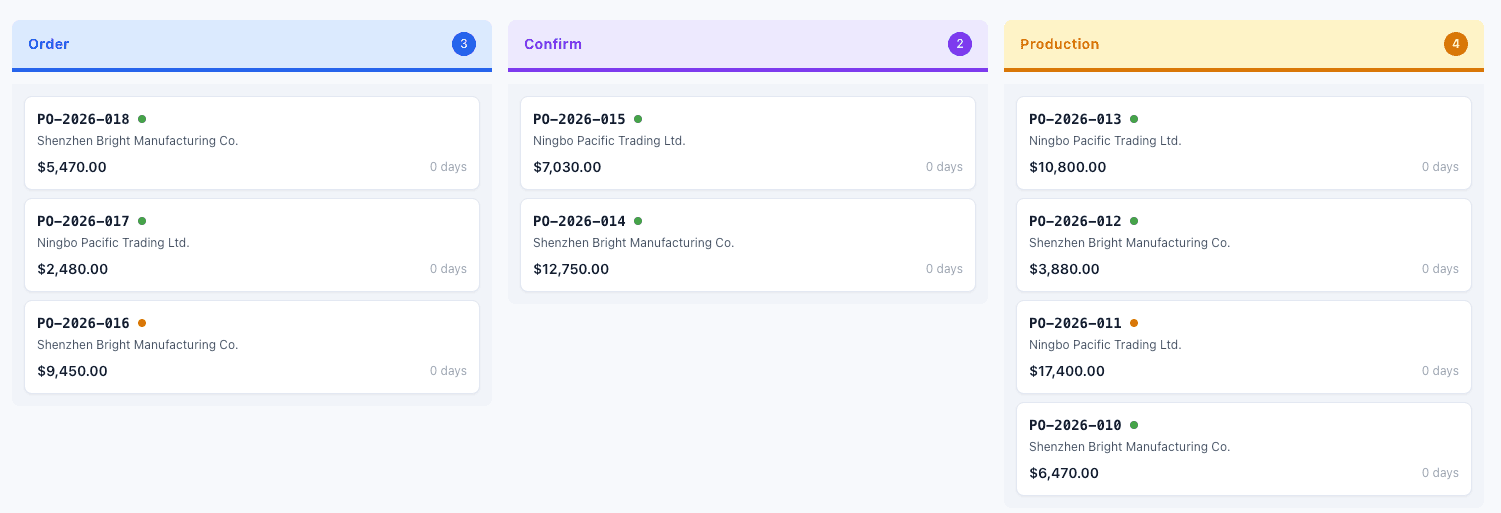
The TACKboard showing active orders across Order, Confirm, and Production stages.
What you can do with the TACKboard
Kanban by TACK Stage
Orders organized into columns by their current TACK stage — Draft, Order, Confirm, Production, QC, Ready, Ship, Deliver. Drag-free, status-driven.
Filter & Focus
Filter by vendor, date range, or health status. See only what matters right now.
Health at a Glance
Green, amber, and red health indicators on every order card. See what’s on track, what’s at risk, and what’s delayed — instantly.
Frequently Asked Questions
The TACKboard is your supply chain dashboard. It shows all your active orders in a kanban-style layout, organized by TACK stage.
The columns represent the 7 TACK stages and are fixed by design. This ensures every team member and partner sees the same lifecycle framework.
Click on any order card to open the order detail, then use the Advance TACK or Revert TACK buttons. Only your team can advance stages.
Partners see their assigned orders in a simplified list view through the Partner Portal. They don’t see the full kanban or other customers’ orders.
Ready to see the TACKboard in action?
We’re onboarding our first 50 customers. Get founding member pricing, priority support, and input on the roadmap.
No commitment. We’ll reach out when it’s your turn.